Giggle Eyes: Integrating Playful Typography into Professional Design Workflows
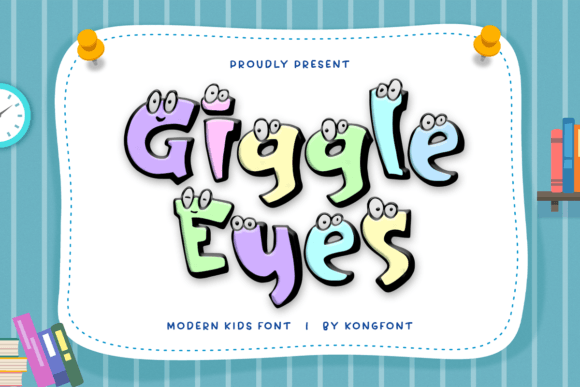
In the landscape of graphic design, typography is rarely just about legibility; it is a primary vehicle for tone and emotional resonance. For designers working within the children’s sector, the challenge often lies in balancing professional execution with an authentic sense of whimsy. Giggle Eyes emerges as a specialized tool in this niche, offering a display font that bridges the gap between chaotic creativity and structured design. It is not merely a decorative asset but a functional component that can streamline the visual communication process for projects targeting young audiences.
Understanding how to integrate Giggle Eyes into your broader creative workflow requires looking beyond its aesthetic appeal. It involves recognizing where playful typography fits into project planning, asset management, and final production. Whether you are a freelance illustrator, a marketing manager for a toy brand, or an educator creating classroom materials, the implementation of this font follows a logical progression from selection to application.
Strategic Selection and Project Alignment
The decision to use a specific typeface should occur during the initial conceptual phase of any project. Before opening your design software, consider the demographic and the medium. Giggle Eyes is engineered specifically for kids' projects, which means its utility is highest when the target audience is between the ages of three and ten. Using it for a teenage educational app or a corporate annual report would create a dissonance that undermines credibility. However, within its intended scope, it serves as a powerful anchor for brand identity.
When evaluating Giggle Eyes against other options, focus on its structural characteristics. The font features bold, friendly letters that maintain high readability despite their whimsical nature. This is a critical factor for accessibility. Many novelty fonts sacrifice clarity for style, making them unsuitable for body text or instructional materials. Giggle Eyes avoids this pitfall, allowing it to function effectively in school materials and children’s books where comprehension is paramount. By selecting a font that balances fun with function early in the process, you reduce the need for extensive revisions later.
Implementation Across Different Media
Once selected, the application of Giggle Eyes varies depending on the output format. Its versatility allows it to interact seamlessly with various design elements, from vector illustrations to photographic backgrounds.
Print Materials and Packaging
In physical products such as toy packaging or birthday invitations, typography must compete with vibrant colors and complex graphics. Giggle Eyes’ bold weight ensures it stands out without overwhelming the composition. For packaging designers, the font’s distinct character shapes can become part of the brand’s visual signature. When laying out these designs, consider using the font for headlines and key call-to-action phrases, while pairing it with a neutral sans-serif for regulatory text or detailed instructions. This hierarchy maintains visual interest while ensuring compliance with safety standards.
For educators and publishers creating school materials, the font’s clarity supports learning objectives. Worksheets, posters, and reading aids benefit from typefaces that engage students without causing cognitive overload. Giggle Eyes can be used for section headers or problem statements, guiding the student’s eye through the material in a friendly, non-intimidating manner.
Digital Interfaces and Social Media
In digital workflows, the integration of Giggle Eyes extends to web banners, social media graphics, and e-learning modules. The font’s PUA (Private Use Area) encoding is a significant technical advantage here. PUA encoding allows designers to access alternate glyphs, swashes, and decorative elements directly through standard character maps or glyph panels in software like Adobe Illustrator, Photoshop, or Canva. This eliminates the need for complex layering or manual vector editing to achieve unique letterforms.
For social media managers, this feature accelerates content creation. Instead of spending time customizing each letter individually, you can quickly insert stylistic alternates to create eye-catching quotes or announcements. This efficiency is crucial for maintaining a consistent posting schedule while keeping the visual quality high.
Technical Compatibility and Workflow Efficiency
A smooth design workflow depends heavily on technical compatibility. Giggle Eyes is designed to work across major operating systems and design platforms. However, proper installation and organization are key to long-term efficiency. When adding this font to your library, ensure it is categorized correctly within your font management software. Tagging it with keywords such as "display," "kids," "playful," and "bold" allows for rapid retrieval during future projects.
Compatibility with common design tools is essential. Whether you are using industry-standard suites like Adobe Creative Cloud or more accessible platforms like Canva or Affinity Designer, Giggle Eyes behaves predictably. The PUA encoding ensures that special characters are accessible via standard shortcuts or glyph palettes, reducing friction in the creative process. This reliability minimizes technical troubleshooting, allowing you to focus on design execution rather than software limitations.
Pairing and Visual Hierarchy
No font exists in isolation. To maximize the impact of Giggle Eyes, it must be paired with complementary typefaces. Because Giggle Eyes is a display font with strong personality, it works best when contrasted with simpler, more neutral fonts. A clean geometric sans-serif or a classic humanist serif can provide a stable foundation for body text, allowing Giggle Eyes to shine in headings and accents.
- Contrast in Weight: Pair the boldness of Giggle Eyes with a light or regular weight companion font to create clear visual hierarchy.
- Contrast in Style: Avoid pairing it with other novelty or handwritten fonts, which can create visual clutter. Stick to structured, readable typefaces for supporting text.
- Color Harmony: The playful nature of the font lends itself to bright, saturated colors. However, ensure sufficient contrast between the text and background to maintain readability, especially in printed materials.
By establishing these pairing rules early in your style guide, you ensure consistency across all deliverables. This is particularly important for brands that produce multiple touchpoints, from packaging to digital ads. Consistent typography reinforces brand recognition and trust.
Quality Control and Final Output
The final stage of any design process involves rigorous quality control. When using Giggle Eyes, pay close attention to kerning and spacing. Display fonts often have unique spacing metrics that may require manual adjustment in large headlines. Check for awkward gaps between specific letter combinations and adjust tracking as needed to ensure a cohesive look.
For print projects, verify that the font renders correctly at various sizes. While Giggle Eyes is designed to be readable, extremely small text may lose its distinctive features. Ensure that critical information remains legible even when scaled down. In digital contexts, test the font across different devices and screen resolutions to confirm that the PUA-encoded glyphs display correctly and do not revert to default characters.
Integrating Giggle Eyes into your design toolkit is more than just adding a new font; it is about adopting a resource that enhances your ability to communicate joy and creativity efficiently. By understanding its technical features, strategic applications, and pairing possibilities, you can elevate your children’s focused projects with professionalism and flair. The result is a seamless workflow that produces engaging, high-quality designs resonating with young audiences and satisfying client expectations.