Integrating Frightening: A Practical Guide to Using Bold Halloween Typography in Professional Design Workflows
Seasonal marketing campaigns require more than just timely content; they demand visual assets that capture attention immediately while maintaining brand integrity. For designers, marketers, and small business owners preparing for the autumn rush, selecting the right typeface is a critical decision point in the creative process. Frightening emerges as a specialized tool in this context, offering a bold, playful display font designed specifically for Halloween themes. Unlike generic spooky fonts that often sacrifice readability for effect, this typeface balances exaggerated, sharp-edged characters with a whimsical, cartoonish aesthetic. Understanding how to integrate this asset into your broader design workflow can significantly enhance the impact of your seasonal materials.
Understanding the Asset Within Your Design Stack
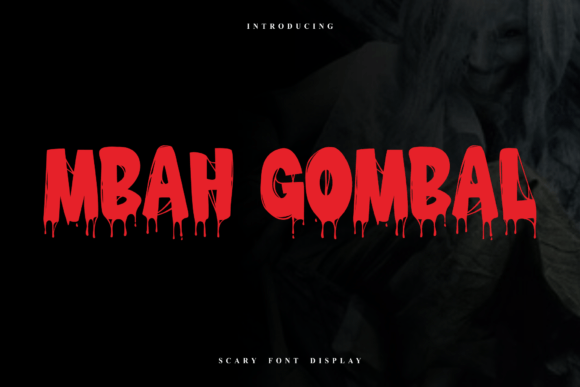
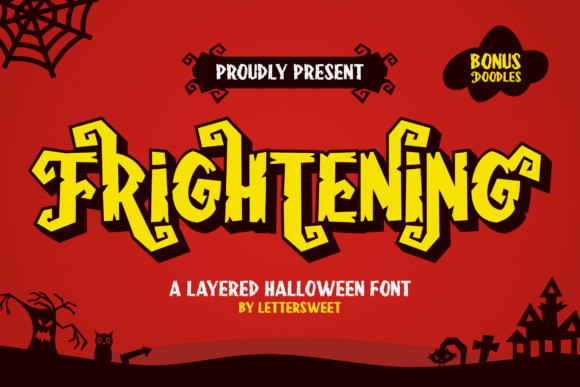
Before implementing any new typographic element, it is essential to understand its technical characteristics and where it fits within your existing resource library. Frightening is not a body text font; it is a display typeface intended for headlines, logos, and short-form copy. The characters are thick and irregular, featuring jagged strokes and curling elements reminiscent of classic horror movie posters but softened by a fun, approachable vibe. This distinction is crucial for project planning. If you attempt to use it for long paragraphs or detailed informational text, you will compromise user experience and readability.
In a professional workflow, this font serves as a primary visual anchor. It interacts with other design elements by providing immediate thematic context. When paired with clean, sans-serif body fonts, it creates a hierarchy that guides the viewer’s eye from the festive headline to the actionable information. Recognizing this role helps prevent common mistakes, such as overusing decorative elements or clashing styles that dilute the overall message.
Pre-Production: Preparation and Compatibility Checks
Successful implementation begins before you open your design software. During the preparation phase, verify that Frightening is compatible with your current tools. Most modern design platforms, including Adobe Creative Cloud, Canva, and various web-based editors, support standard font formats like OTF and TTF. However, if you are working within a constrained ecosystem, such as a specific email marketing platform or a legacy content management system, you may need to convert the text into images or SVGs to preserve the unique jagged strokes and layered effects.
Organization is also key at this stage. Create a dedicated folder for your Halloween campaign assets. Store the font files alongside color palettes, image references, and brand guidelines. This ensures that when you move into the execution phase, you are not searching for resources, which disrupts flow and efficiency. Consider creating a style guide snippet that defines how Frightening should be used. Specify minimum sizes, acceptable color combinations, and pairing rules. This documentation is invaluable if you are collaborating with a team or outsourcing parts of the design work.
Execution: Leveraging Layered Features for Depth
One of the standout features of Frightening is its layered structure. This allows for different color combinations and shadow effects, adding depth and dimension to your designs. In a practical workflow, this means you can achieve complex visual results without relying heavily on external graphic effects or intricate manual shading.
- Base Layer: Start with the solid base character in a dark, grounding color like deep purple or black.
- Highlight Layer: Overlay a secondary layer in a contrasting hue, such as neon green or bright orange, to create a 3D pop.
- Shadow Effects: Use the irregular forms to cast stylized shadows that enhance the spooky yet whimsical feel.
This layered approach is particularly effective for digital ads and social media graphics where screen real estate is limited. By using the font’s inherent depth, you make the text stand out against busy backgrounds without cluttering the composition. For print materials like posters or flyers, ensure your printing process supports multi-layer color registration if you plan to exploit these features fully. Otherwise, simplify the design to a single bold color to maintain clarity and reduce production costs.
Integration Across Marketing Channels
Once the design principles are established, the next step is deploying Frightening across various touchpoints. Consistency is vital for brand recognition during seasonal campaigns. Here is how the font can be adapted for different mediums:
- Social Media Graphics: Use large, centered headlines for Instagram stories or Facebook posts. The playful nature of the font encourages engagement and shares. Keep the copy short to let the typography shine.
- Email Headers: Embed the font as an image in your email templates. Since many email clients do not support custom web fonts, this ensures all recipients see the intended design. Use it for subject line previews or main banner headers to increase open rates.
- Website Banners: For landing pages, use Frightening for hero section titles. Ensure the file size is optimized for fast loading times. Pair it with high-contrast buttons to drive conversions.
- Physical Decorations: If you run a brick-and-mortar store, use the font for window decals, signage, and menu boards. The thick, exaggerated characters are readable from a distance, making them ideal for attracting foot traffic.
Each channel requires slight adjustments in scale and contrast, but the core identity remains the same. This cross-channel consistency reinforces the campaign theme and makes your brand instantly recognizable during the Halloween season.
Quality Control and Accessibility Considerations
While Frightening is designed to be approachable, its irregular forms and sharp edges can pose challenges for accessibility. During the quality control phase of your workflow, test your designs for readability. Ensure there is sufficient contrast between the text and the background. Avoid placing the font over complex patterns or low-contrast images, as this can make the jagged strokes difficult to decipher for users with visual impairments.
Additionally, consider the tone. Although the font has a cartoonish aesthetic, it is still rooted in horror themes. Evaluate whether this aligns with your brand voice and audience expectations. For family-oriented brands, emphasize the whimsical aspects by using brighter colors and softer pairings. For edgier brands, you might lean into the sharper, more dramatic elements. This nuanced application ensures that the font enhances rather than detracts from your message.
Long-Term Asset Management
After the Halloween season concludes, do not simply discard the assets. Proper organization allows you to archive the work for future reference. Save editable source files with clear naming conventions, such as "Halloween2024_SocialHeader_FrighteningFont.psd." This practice facilitates easier updates for next year’s campaign. You can analyze performance metrics to determine which designs resonated most with your audience. Did the layered color combinations perform better than solid ones? Did certain pairings yield higher engagement? These insights inform future decisions and refine your typographic strategy.
Furthermore, keeping the font licensed and accessible in your library ensures you are ready for any last-minute seasonal opportunities or themed events that may arise outside of October. Having a trusted, versatile display font like Frightening in your toolkit reduces the time spent searching for suitable alternatives under pressure.
Final Thoughts on Strategic Implementation
Incorporating Frightening into your design workflow is not just about choosing a spooky font; it is about strategic visual communication. By understanding its technical features, preparing your environment, leveraging its layered capabilities, and ensuring consistent application across channels, you maximize its impact. This methodical approach transforms a simple typographic choice into a powerful component of your seasonal marketing strategy. Whether you are a freelancer managing multiple clients or a marketer overseeing a large campaign, treating font selection as a structured process leads to higher quality outcomes and greater efficiency. Embrace the playful eeriness of Frightening, but always ground its use in clear, practical design principles.