Articon: Integrating Geometric Precision and Hand-Drawn Character into Modern Design Workflows
In the crowded landscape of digital typography, finding a typeface that balances structural integrity with expressive personality is often a challenge for designers and brand strategists. Articon emerges as a solution to this common friction point, offering a versatile font family that bridges the gap between rigid geometric precision and the organic warmth of hand-drawn aesthetics. For professionals managing branding projects, social media campaigns, or creative illustrations, Articon is not merely a static asset but a dynamic tool that enhances visual communication through its dual-style architecture and innovative ligature system.
Understanding how to effectively integrate Articon into your existing design pipeline requires more than just installing the font files. It demands a strategic approach to when and how you leverage its unique features—specifically the Outline and Solid styles—to achieve consistency, engagement, and distinctiveness across various media platforms.
Deconstructing the Dual-Style Architecture
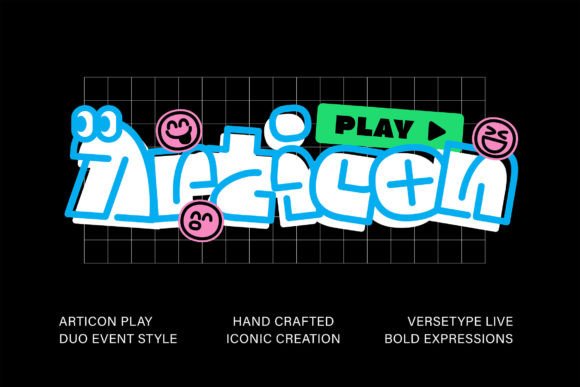
The core strength of Articon lies in its two distinct visual modes: Outline and Solid. This duality allows designers to maintain typographic consistency while varying visual weight and emphasis without switching font families. In a practical workflow, this reduces the cognitive load associated with font pairing and ensures that your visual identity remains cohesive across different touchpoints.
The Solid style provides the necessary gravity for headlines, logos, and primary messaging. Its geometric foundation ensures readability and professionalism, making it ideal for corporate branding or serious editorial content. Conversely, the Outline style introduces a layer of transparency and lightness. This style is particularly effective for background elements, secondary headers, or overlay text where you want the typography to interact with underlying imagery without overpowering it.
When planning a new project, consider mapping these styles to specific hierarchical levels in your design system. For instance, use the Solid variant for call-to-action buttons to drive conversion, while employing the Outline variant for decorative borders or subtle watermarks. This systematic application ensures that every element serves a functional purpose while contributing to the overall aesthetic harmony.
Leveraging Expressive Ligatures for Emotional Engagement
One of the most innovative aspects of Articon is its unique ligature combinations that transform standard character pairs into expressive emoticons. This feature moves typography beyond mere information delivery into the realm of emotional connection. In modern marketing, where audience engagement is paramount, these subtle visual cues can significantly enhance the tone of your message.
Integrating these ligatures requires a shift in how you approach copywriting and layout. Instead of treating text and graphics as separate entities, Articon allows them to merge. For social media managers, this means you can create eye-catching graphics that feel personal and immediate. A simple greeting can be elevated by a ligature that adds a wink or a smile, creating a sense of intimacy with the audience.
However, effective use of these ligatures demands restraint and context awareness. In formal business communications or legal documents, these expressive elements may undermine credibility. Therefore, establish clear guidelines within your brand style guide regarding where and when these ligatures are appropriate. They excel in casual social posts, internal team communications, and creative advertising campaigns, but should be used sparingly in high-stakes professional documentation.
Strategic Applications in Branding and Logo Design
For entrepreneurs and small business owners, establishing a memorable brand identity is critical. Articon’s distinctive styles offer a robust foundation for logo design. The geometric precision ensures that the logo scales well across various mediums, from favicon icons to large-format signage, while the hand-drawn touch prevents the brand from appearing sterile or generic.
When developing a logo, start by experimenting with the Solid style to establish the core shape and structure. Once the fundamental form is approved, explore how the Outline style can be used for secondary branding materials, such as business cards, letterheads, or packaging patterns. This creates a visual ecosystem where the brand feels unified yet versatile.
Furthermore, the unique ligatures can serve as standalone brand marks or icons. By isolating specific emotive combinations, you can create a library of custom icons that reinforce your brand’s personality. This approach not only saves time on graphic design but also ensures that every visual element is intrinsically linked to your typographic identity.
Enhancing Social Media and Marketing Materials
In the fast-paced environment of social media, capturing attention within seconds is essential. Articon’s ability to combine text and expression makes it an invaluable asset for creating scroll-stopping content. Marketers can use the font to design quote graphics, promotional banners, and story templates that stand out in crowded feeds.
To maximize efficiency, create reusable templates in your preferred design software that utilize Articon’s styles. Set up master slides or Canva templates where the Solid style is reserved for key messages and the Outline style for decorative frames. This standardization accelerates the content creation process, allowing your team to produce high-quality visuals consistently without starting from scratch each time.
Additionally, consider the psychological impact of the hand-drawn touch. In an era of AI-generated perfection, audiences crave authenticity. Articon’s slight irregularities and human-centric feel can make your brand appear more approachable and trustworthy. Use this to your advantage in customer testimonials, behind-the-scenes content, and community engagement posts.
Implementation in Creative Projects and Illustrations
For illustrators and creative directors, Articon serves as both a typographic element and a graphical component. Its geometric lines can complement minimalist illustrations, while its expressive ligatures can add narrative depth to complex scenes. When working on editorial illustrations or book covers, use Articon to bridge the gap between text and image, creating a seamless visual experience.
Preparation is key when integrating Articon into illustration workflows. Ensure that your design software supports OpenType features, which are necessary to access the special ligatures. Test the font at various sizes to ensure that the intricate details of the Outline style remain visible and that the Solid style maintains its impact. Adjust tracking and leading carefully, as the geometric nature of the font may require slight tweaks to achieve optimal readability in dense text blocks.
Moreover, consider the long-term usability of your designs. Articon’s timeless blend of geometry and hand-drawn charm ensures that your work will not quickly look dated. This longevity is crucial for projects that need to remain relevant over extended periods, such as educational materials, corporate reports, or evergreen web content.
Best Practices for Workflow Integration
To fully realize the potential of Articon, adopt a structured approach to its implementation:
- Audit Your Current Assets: Review existing brand materials to identify where Articon can replace less effective fonts. Look for opportunities to unify disparate visual elements under a single typographic system.
- Define Usage Rules: Create a concise style guide that specifies when to use Outline versus Solid styles and which ligatures are appropriate for different contexts. Share this with all team members to ensure consistency.
- Test Across Platforms: Verify how Articon renders on different devices and operating systems. While web fonts have improved significantly, cross-browser testing remains essential to maintain quality control.
- Iterate and Refine: Gather feedback on initial implementations. Monitor engagement metrics on social media posts using Articon to determine if the expressive elements are resonating with your audience.
By treating Articon as a strategic component of your design toolkit rather than just a decorative addition, you can enhance both the efficiency of your workflow and the impact of your visual communications. Its versatility allows it to adapt to various roles, from the backbone of a corporate identity to the playful accent in a social media campaign, making it a valuable investment for any creative professional committed to quality and innovation.