Unlocking the Retro Charm of Vectra: A Practical Guide for Designers
Typography is often the unsung hero of visual communication. It sets the tone before a single word is read, influencing how an audience perceives a brand, event, or message. In the crowded landscape of digital design, finding a typeface that balances personality with readability can be a challenge. This is where Vectra enters the conversation. As a playful and versatile display font with a distinct retro twist, it offers designers a unique tool to inject nostalgia and vibrancy into their work. However, simply downloading a font is not enough. To truly leverage its potential, one must understand its nuances, common pitfalls, and best practices.
Understanding the Dual Nature of Vectra
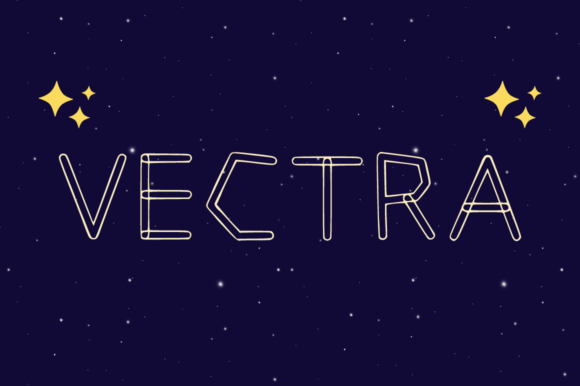
At its core, Vectra is designed to make a statement. It features both outline and filled styles, providing immediate flexibility for various design contexts. The filled style offers boldness and weight, ideal for grabbing attention in headlines, while the outline version adds a layer of sophistication and lightness, perfect for layered compositions or backgrounds. This duality is what makes Vectra so appealing to marketers, bloggers, and small business owners who need their visuals to pop without sacrificing aesthetic coherence.
Many beginners mistakenly treat these two styles as interchangeable without considering contrast. Using the outline style on a busy background, for example, can render text illegible. Conversely, using the filled style in tight spaces can create visual clutter. Understanding when to deploy each variant is crucial for maintaining clarity and impact.
Common Mistakes When Using Display Fonts
While Vectra is undeniably charming, it is not a cure-all for poor design decisions. One of the most frequent errors creators make is overusing display fonts. Because Vectra has such a strong character, it demands respect. Using it for body text or long paragraphs is a recipe for reader fatigue. Display fonts are engineered for short bursts of information—titles, logos, and call-to-action buttons. When forced into lengthy copy, the whimsical curves and retro details become distracting rather than engaging.
Another overlooked detail is pairing. Many designers pair Vectra with other decorative fonts, creating a visual clash that confuses the viewer. The vibrant and whimsical aesthetic of Vectra works best when anchored by a neutral, clean sans-serif or a simple serif font. This balance allows Vectra to shine as the focal point while ensuring the rest of the content remains easy to digest. For instance, pairing Vectra’s headline with a minimalist geometric sans-serif for subheaders creates a modern-retro hybrid that feels intentional and polished.
The Trap of Ignoring Context and Audience
Design does not exist in a vacuum. A common misunderstanding is assuming that because a font is "fun," it fits every fun project. Vectra’s retro twist evokes specific eras and emotions—think mid-century modern, 70s psychedelia, or 80s arcade vibes. If you are designing for a corporate financial report or a medical brochure, Vectra may send the wrong message, regardless of how much you like its appearance. Always align your typographic choices with the brand’s voice and the audience’s expectations.
For entrepreneurs and freelancers, this means asking critical questions before committing to a typeface. Does this font reflect the brand’s heritage? Is the target audience likely to appreciate a nostalgic aesthetic? If the answer is no, even the most beautiful font will fail to communicate effectively. Misalignment here can lead to wasted resources and a disconnect between the brand and its customers.
Technical Considerations for Optimal Results
Beyond aesthetics, technical execution plays a vital role in how Vectra performs. One frequent issue is improper kerning and spacing. Display fonts often have unique letterforms that require manual adjustment to look professional. Relying solely on default settings can result in awkward gaps or collisions between characters, particularly with the outline style. Taking the time to tweak tracking and kerning ensures that the text flows smoothly and maintains its structural integrity.
Additionally, consider the medium. Vectra looks stunning in high-resolution print materials like posters and packaging. However, on smaller mobile screens, the intricate details of the outline style might disappear or appear pixelated if not optimized correctly. Always test your designs across multiple devices and sizes. What looks bold and clear on a desktop monitor may become illegible on a smartphone. Scaling down the font size or switching to the filled style for smaller applications can mitigate this risk.
How to Evaluate and Choose Wisely
Before integrating Vectra into your next project, take a moment to evaluate its fit. Start by defining the hierarchy of your design. Where do you need emphasis? How much text needs to be displayed? If the project relies heavily on dense information, Vectra should play a supporting role, limited to headers. If the design is minimal and image-heavy, Vectra can take center stage.
- Check Legibility: Print a sample or view it on a mobile device to ensure readability at various sizes.
- Test Pairings: Experiment with at least three different secondary fonts to find the best complement.
- Review Licensing: Ensure you have the appropriate license for commercial use, especially if you are a freelancer or agency working for clients.
- Assess Color Contrast: The outline style requires high-contrast backgrounds to remain visible. Avoid placing it over complex patterns or low-contrast colors.
By following these steps, you avoid the common pitfall of choosing a font based solely on initial appeal. Instead, you make an informed decision that supports the overall goals of your project.
Maximizing Impact with Strategic Application
To get the most out of Vectra, think creatively about its application. Use the filled style for primary headlines to establish authority and presence. Then, incorporate the outline style for secondary elements, such as dates, locations, or decorative accents. This creates a cohesive visual language that guides the viewer’s eye through the design. For example, in a concert poster, the band name could be in bold filled Vectra, while the tour dates appear in the elegant outline version, creating a dynamic interplay between weight and lightness.
Moreover, do not be afraid to experiment with color. Vectra’s retro roots lend themselves well to vibrant palettes. Mustard yellows, teal blues, and burnt oranges can enhance its nostalgic feel. However, maintain restraint. Too many colors can dilute the font’s impact. Stick to a limited palette that complements the typography rather than competing with it.
Final Thoughts on Typographic Discipline
Choosing a font like Vectra is an invitation to play, but it requires discipline to execute well. It is not just about adding a touch of nostalgia; it is about communicating clearly and effectively. By avoiding common mistakes such as overuse, poor pairing, and ignoring context, you can harness the full power of this versatile typeface. Whether you are a seasoned designer or a beginner exploring the world of typography, remember that the best designs are those where form follows function. Let Vectra bring the flair, but let your strategic thinking ensure it delivers the message.
Ultimately, the goal is to create designs that resonate. Vectra provides the tools, but your judgment provides the direction. Take the time to understand its strengths and limitations, and you will find it to be an invaluable asset in your creative toolkit. With careful application and thoughtful consideration, your text will not just stand out—it will speak volumes.